In the dynamic world of visual displays, the ability to create stunning imagery is paramount. Barry Jansen, a leading expert in LED technology, emphasizes, “The magic lies in how to combine multiple LED panels seamlessly.” This insight speaks to the heart of display innovation.
Combining multiple LED panels can result in impressive, large-scale visuals. However, achieving seamless integration requires knowledge and technique. It’s not simply about placing panels side by side. Over the years, Barry has seen many projects fall short due to poor alignment and inadequate calibration. Mastering this art means understanding the technology behind LED panels, including pixel density and brightness levels.
One must also consider the physical setup. Factors like mounting and cabling can complicate the process. A thoughtful approach is necessary for perfecting the viewing experience. There is always room for reflection. Mistakes can lead to inconsistent displays. Learning from these challenges is essential for success in the world of LED panel integration. Ultimately, the goal is to create captivating displays that resonate with audiences.
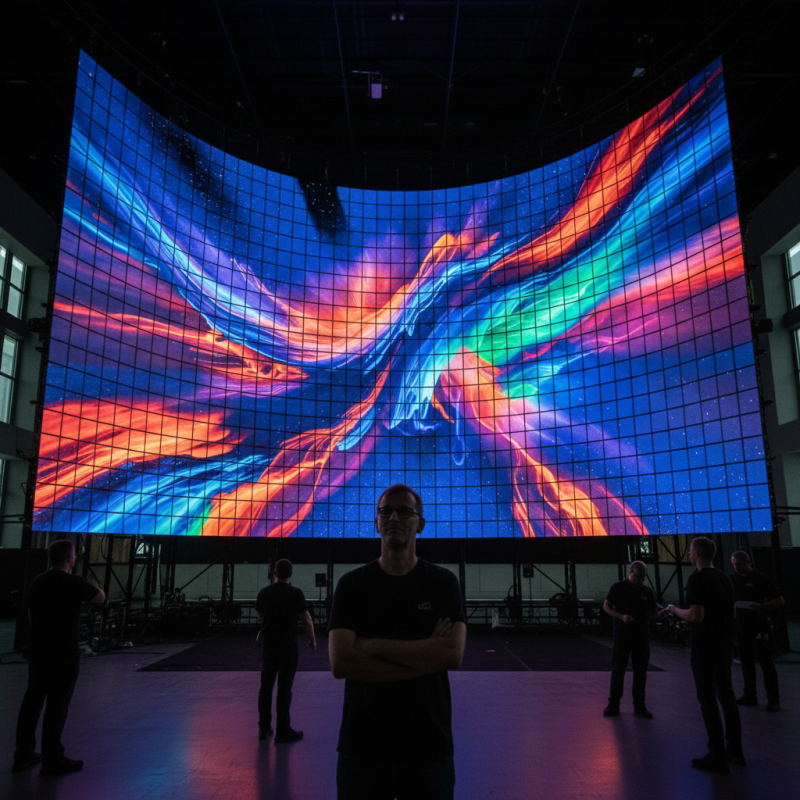
LED panel technology has revolutionized the way we create visual displays. These panels come in various sizes and shapes, offering flexibility for different applications. Understanding their basic components can help you make informed choices. LED panels consist of light-emitting diodes, a control system, and a housing structure that protects the internal components. The quality of LEDs significantly affects brightness and color accuracy.
One common challenge is achieving seamless integration when combining multiple panels. This involves careful alignment and calibration. Without precise setup, the display might show visible seams or color mismatches. Even experienced users sometimes overlook minor adjustments, resulting in an uneven appearance. Using software tools for calibration can greatly enhance visual consistency.
Incorporating LED technology into your projects requires attention to detail. Power management, for example, is crucial to ensure uniform brightness across all panels. Differences in brightness can distract viewers, diminishing the overall impact. Investing time in understanding these basics will lead to more stunning displays. The process can be complex, and learning from mistakes is part of the journey. Each installation teaches us something new, refining our approach to future projects.
Selecting the right LED panels is crucial for creating captivating displays. Start by assessing the display environment. Indoor and outdoor settings have different brightness needs. Look for panels that suit the ambient light conditions. For example, outdoor panels require higher brightness levels to stand out against sunlight.
Tips: Consider panel resolution. A higher resolution improves image clarity, especially in large displays. If your audience views the display from a distance, lower resolution may suffice. Assess viewing angles, too. Wide-angle visibility ensures your content reaches every viewer, avoiding any missed messages.
Also, think about the installation process. Some panels are easier to mount and combine than others. Ensure you have a plan in place for connections and power sources. Check for compatibility among panels if combining different types. A lack of standardization could lead to visual inconsistencies.
It’s essential to conduct tests before the final setup. Sometimes, issues may arise in color consistency and brightness unevenness. Addressing these problems in advance can save time and frustration later.
| Panel Size (inches) | Resolution (pixels) | Brightness (nits) | Viewing Angle (degrees) | Refresh Rate (Hz) | Power Consumption (W) |
|---|---|---|---|---|---|
| 32 | 1920x1080 | 500 | 178 | 60 | 100 |
| 48 | 3840x2160 | 600 | 178 | 60 | 150 |
| 55 | 3840x2160 | 800 | 178 | 120 | 200 |
| 65 | 3840x2160 | 1000 | 178 | 120 | 250 |
When preparing an installation area for multiple LED panels, several important factors must be addressed. Start by evaluating the location. The surface should be flat and stable. Uneven surfaces can lead to misalignment, causing display issues. This could impact the overall visual effect of your arrangement.
Next, pay attention to power supply needs. Multiple panels will require adequate power. Ensure there are sufficient outlets nearby. Calculate the total wattage needed to prevent overloads. It's also vital to consider cable management. Neatly organizing cables not only improves aesthetics but also ensures safety. Messy cables can create hazards, especially in crowded spaces.
Lighting conditions are another critical aspect. Avoid direct sunlight on your panels, as this can cause glare and reduce visibility. Testing the display in different lighting scenarios can help identify potential problems. Additionally, think about audience viewing angles. Ensure that every viewer can see the content clearly without obstruction. Implementing these practical steps will significantly enhance the installation quality and the viewer's experience.
In recent years, LED panels have revolutionized visual display technology. Many businesses are now investing in large LED setups for impactful presentations. According to a 2022 market report, LED panel revenue is projected to grow annually by 12.3% through 2026. This growth highlights the importance of mastering the art of connecting and configuring multiple panels.
To start, ensure you understand the specifications of the LED panels you are using. Each panel may have unique cabling requirements. Use connectors that fit standard protocols like HDMI or DisplayPort. These connections are essential for seamless synchronization. When configuring the display, consider hardware limitations. For example, certain panels may have refresh rates that differ from others. This can lead to inconsistent visual output.
Calibration is also key. Use software solutions to align brightness and color across multiple panels. Some users report color discrepancies when panels are manufactured in batches. Regular testing is vital for maintaining display quality. After setup, monitor your display to identify any lag or distortion issues. Even small misalignments can disrupt the viewer’s experience. Keep in mind that a meticulously arranged LED display can elevate your messaging significantly, yet achieving perfection requires continuous adjustment and evaluation.
When combining multiple LED panels for a display, testing and optimizing the setup is crucial. The ideal brightness level, according to industry standards, should be between 800 to 1200 nits for outdoor use. This ensures visibility despite varying ambient light. For indoor applications, a range of 300 to 500 nits is generally effective.
After installation, calibrating the color is vital. Use specialized software to align luminance and color temperature across panels for a cohesive look. Research shows that uneven color can distract viewers, reducing engagement. Collaborating with professionals familiar with color calibration can yield better results and save time.
Tip: Regularly check connections and data cables for secure fit. A loose connection can disrupt performance and pixel brightness.
Testing should include viewing angles. A study highlighted that 60% of audience engagement declines when the angle exceeds 30 degrees. Positioning panels within recommended angles maximizes viewer experience.
Tip: Measure reflections that may occur on surfaces around the display. Reflection can impact visibility, especially in bright environments. Adjust panel placement to mitigate this issue effectively.
: The surface must be flat and stable. Uneven surfaces can cause misalignment. This leads to display issues.
Proper cable management enhances aesthetics and safety. Messy cables can create hazards, especially in crowded areas.
Ensure there are enough outlets. Calculate total wattage to prevent overloads. This will maintain reliable performance.
Direct sunlight can cause glare. Avoid this by testing displays in varying lighting conditions. Good visibility is essential.
Calibrating color ensures consistency across panels. Uneven colors can distract viewers and reduce engagement significantly.
Brightness should be between 800 to 1200 nits for outdoor setups. This level ensures visibility even in bright light.
Engagement may drop by 60% when viewing angles exceed 30 degrees. Proper positioning can improve the viewer's experience dramatically.
Check connections and data cables frequently. Loose connections can disrupt performance or pixel brightness.
Reflections can hinder visibility, especially in bright environments. Adjusting panel placement can help reduce this issue effectively.
Yes, regular testing and feedback are key. Reflect on previous setups to enhance future installations and avoid mistakes.
In the pursuit of creating striking visual displays, understanding how to combine multiple LED panels seamlessly is essential. The article begins by exploring the basics of LED panel technology, providing readers with foundational knowledge to make informed decisions. Selecting the right panels tailored to specific display needs is crucial, ensuring compatibility and optimal performance.
Preparation of the installation area is the next step, as it sets the stage for a successful assembly. A detailed step-by-step guide illustrates how to connect and configure the LED panels, demystifying the process for novices and experts alike. Finally, the importance of testing and optimizing the setup is emphasized, ensuring that the final display not only meets but exceeds expectations. This comprehensive approach guides readers through the entire journey of creating stunning LED displays.

Aras LED